Digital Style Guide
Adding Content to Pages
Content Types are entities you place on the page for content
Advanced Grid Wrappers are containers that hold Content Types within specific widths. It is also where cards can be placed to sit in rows and wrap to the next row.
Enhancing Pages
Many Content Types have the ability to add animation upon scroll.
Image Guidelines help determine the size of images to upload. It also provides links to help decrease image sizes.
Custom Formats provides text styles not provided in the general TinyMce formatting box options.
Note about viewing Preview pages
When looking at the Content Types placed on a page, the type of Content Type (which sits below the named item) now has a link (example below is General Content Block link). Make sure to not click this link, as it goes directly to the Content Type page to universally make edits.
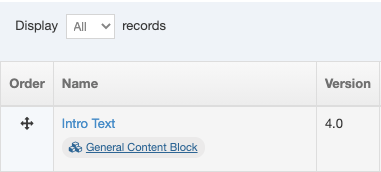
Also Note: Make sure the end of the url only has 1 set of numbers. If there are two sets, delete the last set.
